Tabs in the parameter window.

Often, strategies may contain a large number of parameters. For logical separation and ease of use, these parameters can be divided into different tabs in the window.
When creating an object, the desired name for the tab must be passed as the last parameter in the constructor. If such a tab does not exist yet, it will be added to the parameter window automatically.
Let's look at an example of how this is implemented in the CustomParamsUseBotSample robot.
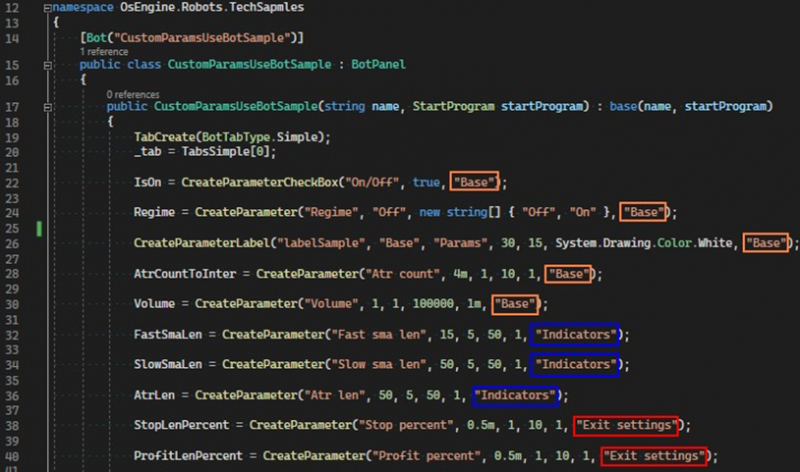
Fig. 1. Distribution of parameters across different tabs.
As you can see, the parameters are distributed across three tabs with the names: Base, Indicators, Exit settings.
In addition, you can create an additional tab and add custom elements to it.
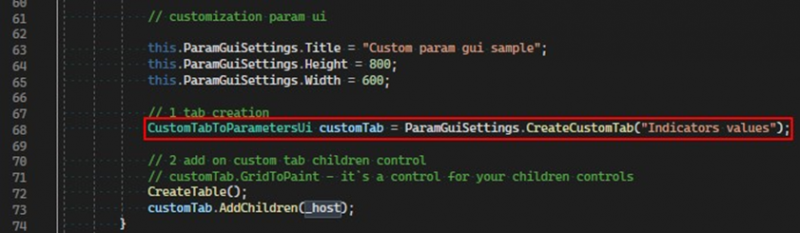
Fig. 2. Creating a custom tab.
And now in the parameter window, we see all these tabs with their corresponding titles.
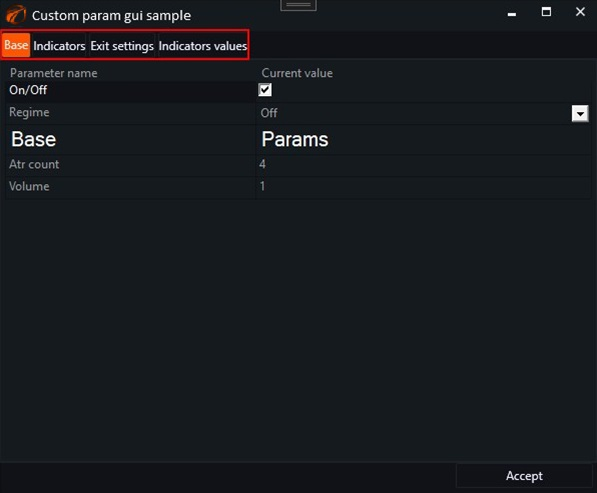
Fig. 3. Appearance of tabs in the parameter window.
If you have any difficulties or questions, please write to the support chat. Link