System time synchronization on remote servers for trading robots.

When purchasing a remote VPS server, you may encounter a problem of time desynchronization between the operating system and the exchange. This can cause issues, even if the accumulated desynchronization is just a few tens of milliseconds.
Most cryptocurrency exchanges will refuse to perform certain types of operations, such as placing orders. This makes trading impossible.
To solve this problem, you can manually synchronize the time on the remote operating system through settings once every few days.
Install special software that will do this for you. This is the method we will discuss.
The Dimension 4 program will help you synchronize the system time. You will need to install it ONCE on all your remote servers. After that, it will do everything automatically.
1. Download the program.
http://www.thinkman.com/dimension4/download.htm
2. Install it.
I won't describe the process. It has a completely standard installer, without any special features. Just agree to everything. And then start the program.
3. Settings.
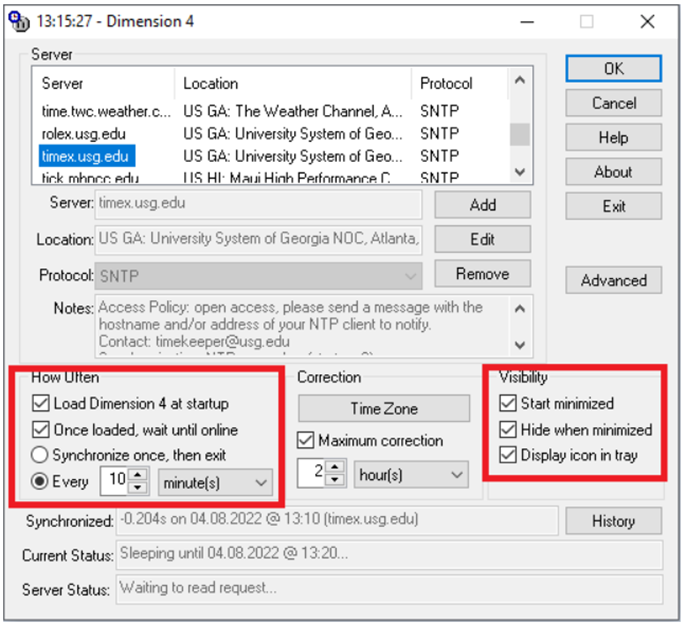
Configure the update frequency and minimize the program. It is not necessary to update more frequently than once every 10 minutes.
This way, your remote server will always be synchronized with the exact network time.
If you have any difficulties or questions, please write to the support chat. Link