Project IndicatorsFactory. Overview of the Indicator Creation Layer.

The process of creating and connecting indicators in OsEngine is managed by the indicator creation layer, which functionality is concentrated within the namespace OsEngine.Indicators. The code files of this layer are located in the directory: OsEngine\project\OsEngine\Indicators\
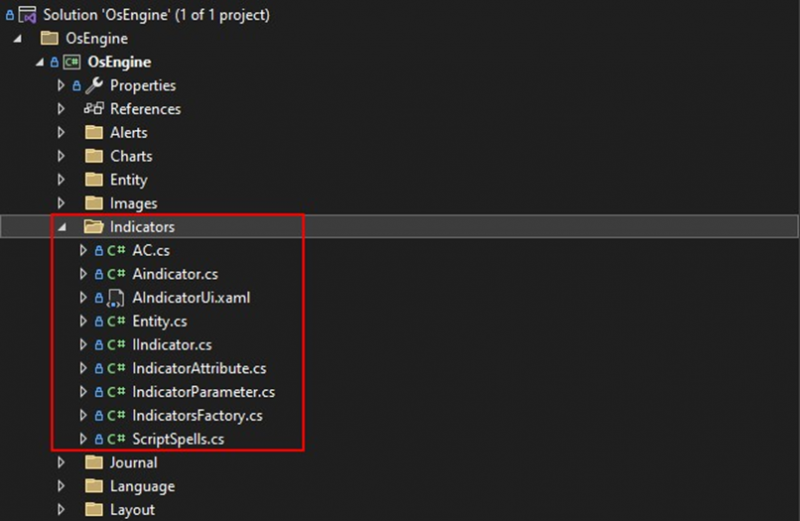
Fig. 1. The placement of the indicator creation layer classes in the project.
There are two methods for creating indicators. The first method, involving the direct implementation of the IIndicator interface, is excessively complex and has become outdated. Therefore, we will not focus on it. Instead, we will immediately proceed to examine the second method, which is the preferred one.
The process of creating indicators is based on inheritance from the abstract class Aindicator, where, in addition to the virtual methods to be overridden in the derived classes, it also contains ready-to-use functionality utilized by all indicators.
To clearly understand the structure of relationships, let's look at the following diagram:
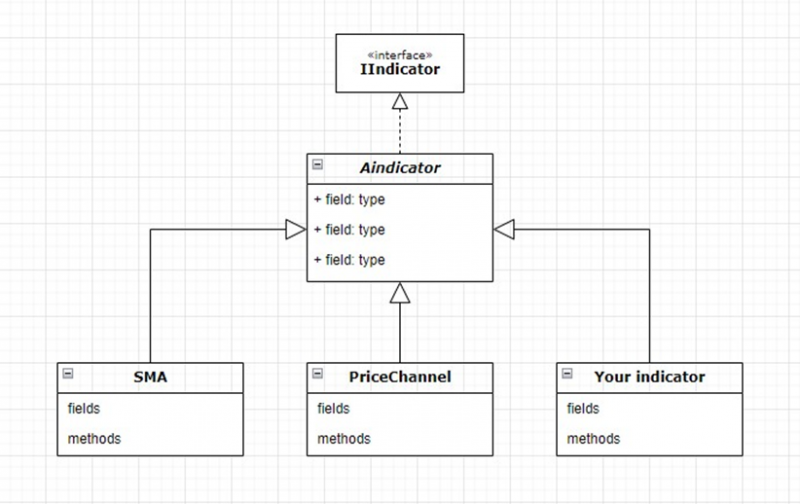
Fig. 2. The inheritance graph of indicators.
An IIndicator interface stands at the top of the hierarchy. Next is the abstract class Aindicator, from which the indicator classes inherit. We will become more familiar with these constructs in future articles.
The direct creation of indicator class instances is the responsibility of the indicator factory. The logic of the factory is contained in the IndicatorsFactory class, which has a number of public static members used in robot creation:
1. IndicatorsWithAttribute – contains a dictionary where the name of the indicator class serves as a key and a reference to the class type object of the indicator as a value.
2. GetIndicatorsNames – returns a list of the names of all script indicators.
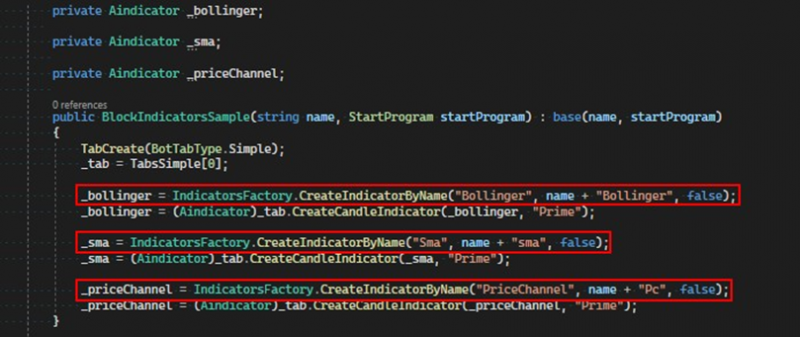
3. CreateIndicatorByName – the main method of the factory, which creates instances of indicators.
The CreateIndicatorByName method accepts the following arguments:
1. nameClass – the name of the indicator class, an instance of which needs to be created;
2. name – an arbitrary name for the indicator class object, to be used in the program and displayed in the user interface;
3. canDelete – a flag indicating whether the user can manually delete this indicator from the chart;
4. startProgram – the type of program in which the indicator is being created, an optional parameter;
As a return value, the method gives an instance of the requested indicator class, cast to the base type Aindicator. The screenshot shows an example of creating three indicators using the factory:
If you have any difficulties or questions, please write to the support chat. Link