PositionBuyAtStopActivateEvent & PositionSellAtStopActivateEvent
public event Action<Position> PositionBuyAtStopActivateEvent;This event signals the activation of a conditional buy order created by the BuyAtStop methods. As a result, a new position is created and passed by the event to its subscribers.
public event Action<Position> PositionBuyAtStopActivateEvent;There is a similar event for short positions; it is triggered at the moment of the activation of a conditional sell order, created by the SellAtStop methods.
Let's consider how to apply these events in a strategy. Suppose trading is conducted on an hourly timeframe. After the candle closes, we will set pending orders to buy and sell at some distance from the closing price. When one trigger, we will cancel the second order.
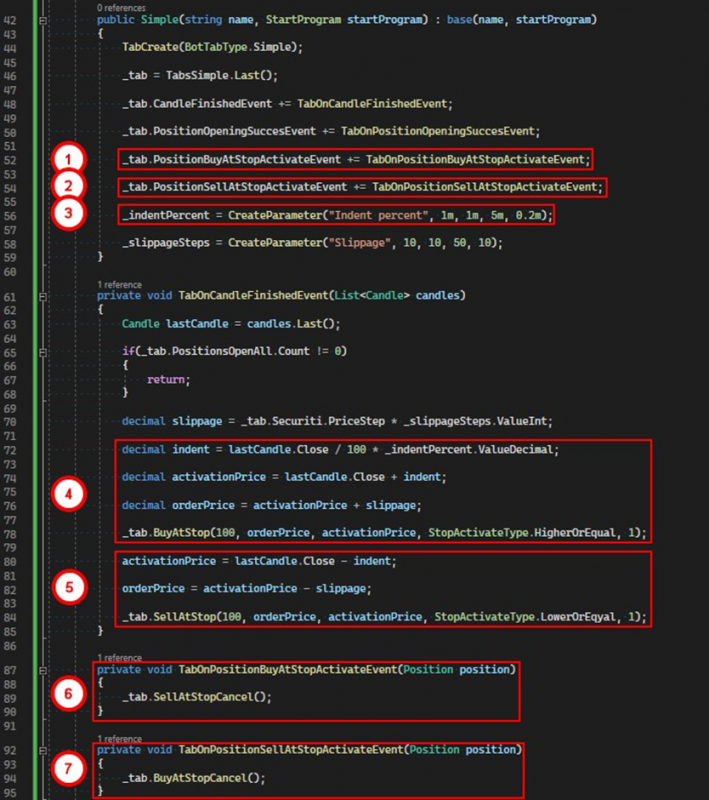
1. Subscribe to the event for the activation of the conditional buy order.
2. Subscribe to the event for the activation of the conditional sell order.
3. Create a parameter that will set the offset as a percentage from the closing price of the candle.
4. Calculate the parameters and create a conditional buy order.
5. Calculate the parameters and create a conditional sell order.
6. If the buy order is activated, in the handler for the PositionBuyAtStopActivateEvent, cancel the sell orders.
7. If the sell order is activated, in the handler for the PositionSellAtStopActivateEvent, cancel the buy orders.
If you have any difficulties or questions, please write to the support chat. Link