Position - virtual positions of robots in OsEngine. Difference from PositionOnBoard.
In previous articles, we have already become familiar with the concept of a position. Let's discuss instances of the Position class in more detail.
Position represents an object-oriented view of an n-number of orders combined together by common reasons for creation. Such reasons include: the need for a robot to operate groups of orders as a whole, to create multi-directional positions, to maintain multiple positions within one strategy. The terminal itself gains the ability to perform analysis, accompany positions, set stops and profits, use emulation mode, and collect statistical indicators.
Each position has its own life cycle. Depending on the actions of the algorithm under normal conditions, the state of the position changes from Opening to Done. The general life cycle of a position is presented in the following diagram:
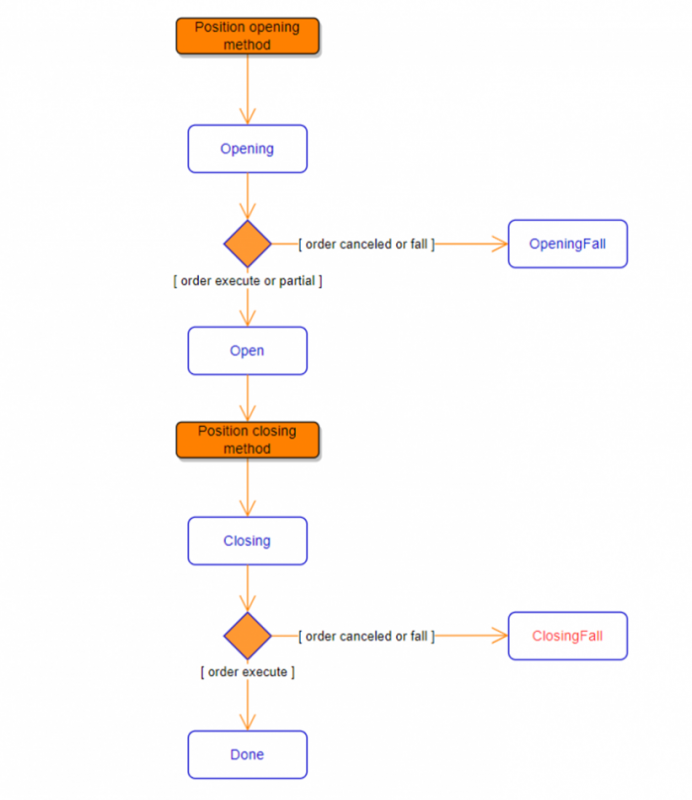
Fig. 1. Life cycle of a position.
OsEngine has a useful feature such as trading in emulation mode. This mode allows testing strategies in situations as close to real trading as possible. Essentially, the robot operates in combat mode and receives real data from the exchange. The only difference from real-time trading is that orders are not sent to the exchange but are emulated by the system. At the same time, the robot operates only with positions, oblivious to the emulation.
From the code, you can enable/disable emulation mode using the property:
public bool OnOffEmulatorsInTabsThis is located in the BotPanel class, which is the base class for all robots. Emulation can also be enabled separately for each tab using the property:
public bool EmulatorIsOnThis functionality is also accessible from the user interface:
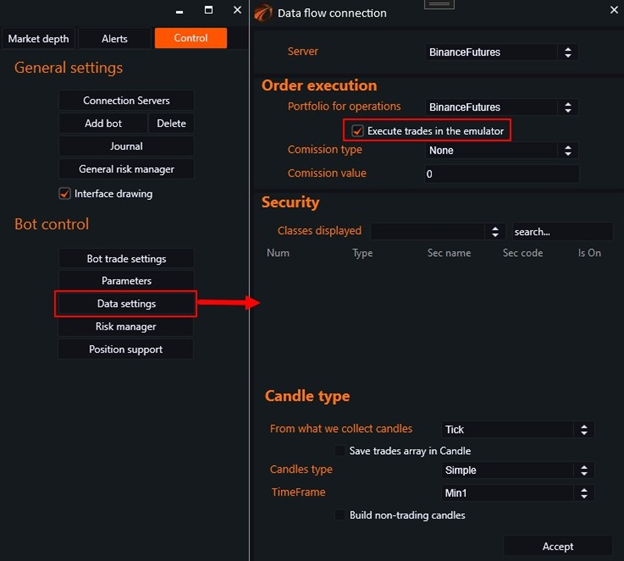
Fig. 2. Emulation mode settings.
It is important to distinguish between positions on the exchange and positions in the terminal. An exchange position reflects the total volume of an instrument owned by a client. In OsEngine, it is described by the PositionOnBoard class, which is used only for providing information and carries no functional load. On the other hand, the Position object is an integral part of any robot and contains only the volume that was acquired by its opening orders.
If you have any difficulties or questions, please write to the support chat. Link