Position Management Module
The Position Management Module allows for configuration of certain behaviors over positions, which will be executed automatically by the tab. It is primarily designed for assisting users who trade manually.
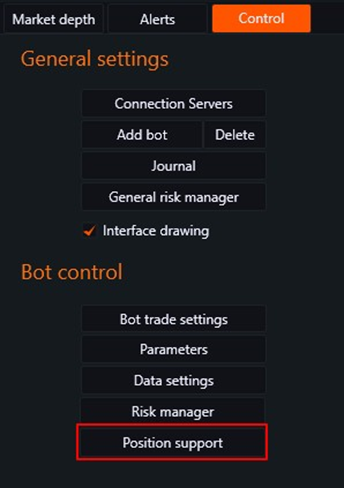
To open the settings window for the module, click on the "Position Management" button.
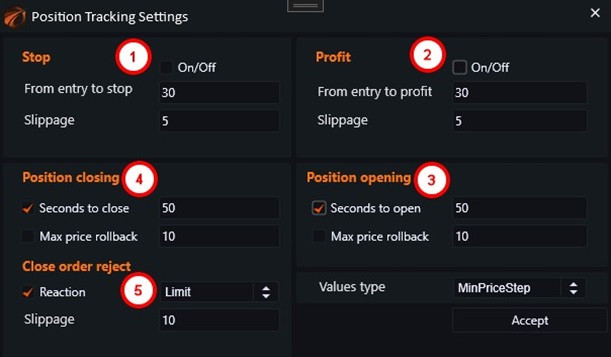
It enables the setting of the following management parameters:
1. Setting a stop-loss for the position.
2. Setting a take-profit for the position.
3. Specifying the lifetime of an opening limit order, after which the order will be cancelled.
4. Specifying the lifetime of a closing limit order, after which the order will be cancelled.
5. Configuring the reaction if the closing limit order has been cancelled. For example, closing the position at market price.
Despite its positive qualities, the module often interferes with the workings of robots. For instance, it cancels limit orders on the strategy's positions, which in turn leads to errors in opening and closing positions.
To disable certain modules for the tab, the following steps should be taken:
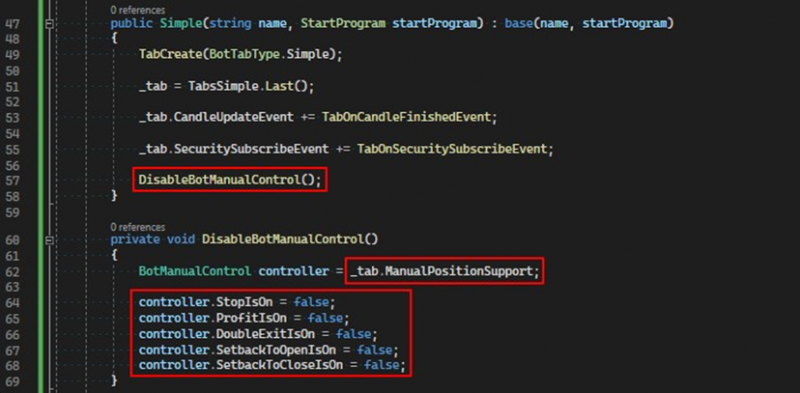
Obtain a link to the BotManualControl object from the tab and set all fields of type bool to false.
All the fields that can be disabled in this way:
StopIsOn = false;
ProfitIsOn = false;
DoubleExitIsOn = false;
SecondToOpenIsOn = false;
SecondToCloseIsOn = false;
SetbackToOpenIsOn = false;
SetbackToCloseIsOn = false;
If you have any difficulties or questions, please write to the support chat. Link