Managing Indicators on the Chart
To manage indicators on the chart of an instrument, there are several members of the class available in the tab.
public IIndicator CreateCandleIndicator(IIndicator indicator, string nameArea)The method sends a command to the drawing master to display the indicator on the candlestick chart. As the first argument, it accepts a reference to the indicator cast to the interface type IIndicator. As the second argument, it takes the name of the chart area. The interface area, which by default displays the candlestick chart, is named "Prime". If it is necessary for the indicator to be displayed over the candlestick chart, this value should be passed. To display the indicator in a separate area, a different arbitrary name should be used.
public T CreateIndicator<T>(T indicator, string nameArea = "Prime")A parameterized version of the method CreateIndicator for displaying indicators, the second parameter of which has the default value "Prime".
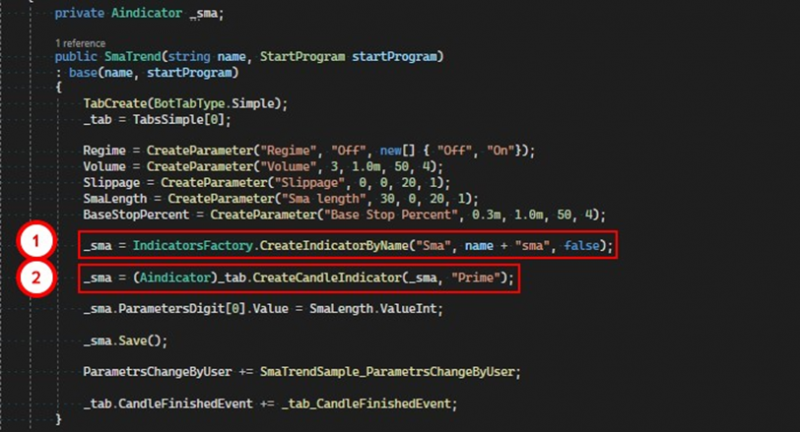
1. First, it is necessary to create the indicator itself using the factory.
2. Then the tab can be instructed to render the indicator.
public void DeleteCandleIndicator(IIndicator indicator)Removes an indicator from the chart, accepting a reference to the instance of the indicator being removed.

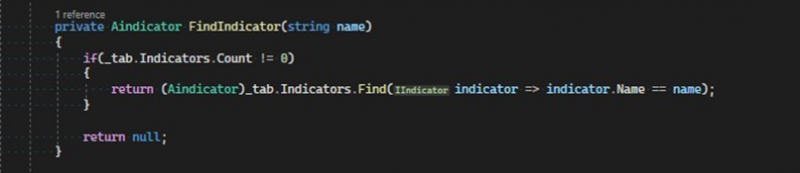
public List<IIndicator> IndicatorsThis property is read-only. It returns a list of all indicators cast to the interface type IIndicator. It can be used, for example, to find a needed indicator.
If you have any difficulties or questions, please write to the support chat. Link