Location of BotTabIndex in the project and general description of capabilities.

The BotTabIndex tab is a source for creating indexes, spreads, and other relationships between instruments. It allows for aggregating multiple securities and using a specified formula to build an index of instrument baskets. Typically, the index tab is used in conjunction with simple tabs. The index is constructed in the form of a candlestick chart based on the specified formula and sends events to the robot when the last value of this chart changes, similar to simple tabs. The robot analyzes this information and carries out trading operations using simple tabs. This method of display allows for overlaying any indicators on the chart and using them in trading. In fact, the number of instruments in the basket is unlimited. Thus, you can replicate any existing index on your own. The only limitation is the performance of your PC.
The BotTabIndex class code is located in the OsEngine\project\OsEngine\OsTrader\Panels\Tab\ folder of the project structure.
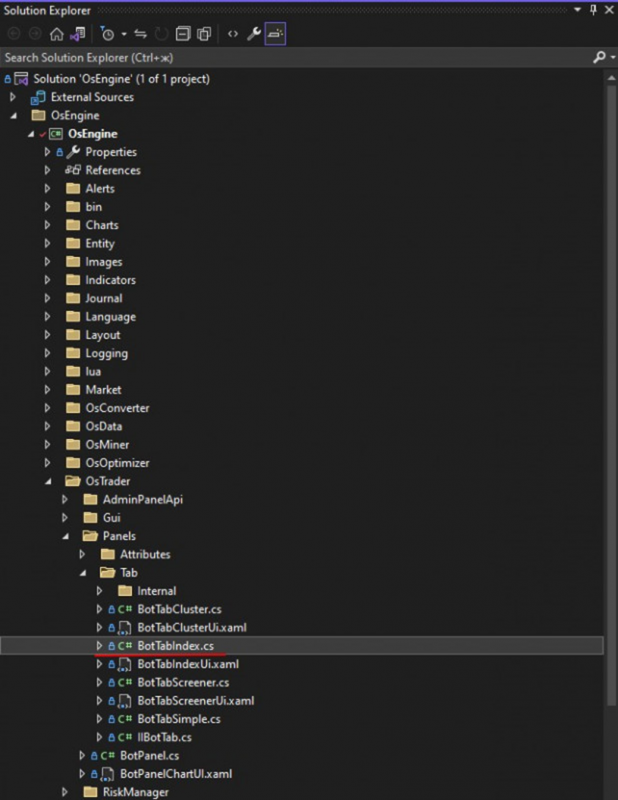
Figure 1. Location of the BotTabIndex class in the project structure.
The process of creating an index tab is outlined below:
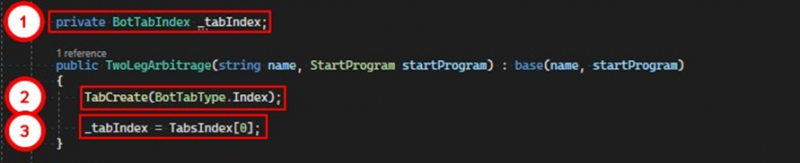
1. Add a private field of type BotTabIndex.
2. Create the tab using the TabCreate method, passing in the corresponding value of the BotTabType enumeration.
3. After creation, all indexes are stored in the TabsIndex list. Save it in the previously created variable.
If you have any difficulties or questions, please write to the support chat. Link