IndicatorsParameters. Types and Applications.

In the realm of financial markets, there is a vast array of indicators, and the vast majority of them have customizable parameters.
In OsEngine, the IndicatorParameter class serves as the base class for all indicator parameters, eliminating the need to create separate windows for each indicator. The use of parameter classes allows for the customization of any indicators using the platform's existing functionality.
Overview of the abstract class IndicatorParameter's interface.
DoDefault - a public method. It resets the target value of the parameter to the default value.
Bind - a public method. It takes as an argument another parameter of the same type and links the main values of the two parameters. When the main value of one parameter is changed, the value of the other will automatically be altered.
Next are abstract members, so we will consider them in the context of derived classes.
Name - a unique name for the parameter.
GetStringToSave - a public method that takes no parameters. It returns a string that contains all the object's fields for further saving in storage.
LoadParamFromString - a public method. It takes a string, parses it, and initializes the object's state.
Type - a property that indicates the type of parameter. The IndicatorParameterType enumeration contains the following constants:
1. Int - the target value of the parameter is an integer.
2. Decimal - the target value of the parameter is a floating-point numeric type.
3. String - the target value of the parameter is a string.
4. Bool - the target value of the parameter is a Boolean value.
ValueChange - a public event. It signals a change in the parameter's target value.
In OsEngine, there are four classes that extend the functionality of the abstract class IndicatorParameter. Each of them is a wrapper over the corresponding primitive types. The respective methods of the class Aindicator, which is the base for all indicators, are used to create parameters. All indicator parameters are displayed in the first tab of the settings window:
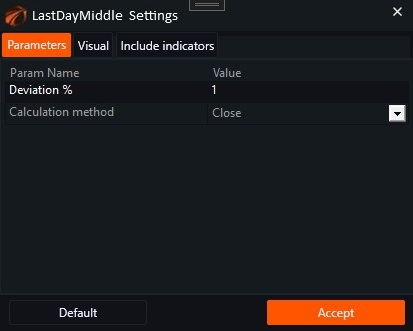
Fig. 1. Indicator parameter settings menu.
IndicatorParameterInt.
The IndicatorParameterInt is used when an integer value is needed as an indicator parameter. For example, in the SMA indicator, there is a parameter such as the number of candles required to calculate the value of the indicator. Let's see how to use this type of parameter with an example:
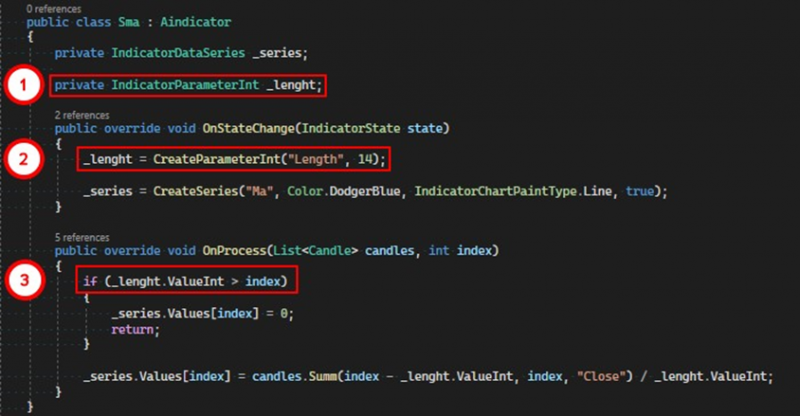
1. Create a private field of type IndicatorParameterInt.
2. Use the method CreateParameterInt to create the parameter itself. The first argument to the method is the desired name for the parameter. It will be displayed in the user interface. The second argument initializes the parameter with default values.
3. Use the main value of the parameter in the logic of the indicator.
The target value of the IndicatorParameterInt is stored in the property ValueInt. When using the parameter, we can change its main value, but you can always find out the value of the parameter at the time of creation by referring to the property ValueIntDefault.
IndicatorParameterDecimal.
The IndicatorParameterDecimal class is used when the indicator requires settings of the decimal type. Let's consider how to use this parameter with the example of the modification of the LastDayMiddle indicator that we made in previous articles. We need to add two more data series that will display the deviation from the middle of the previous day, one upwards by a given percentage, the other downwards.
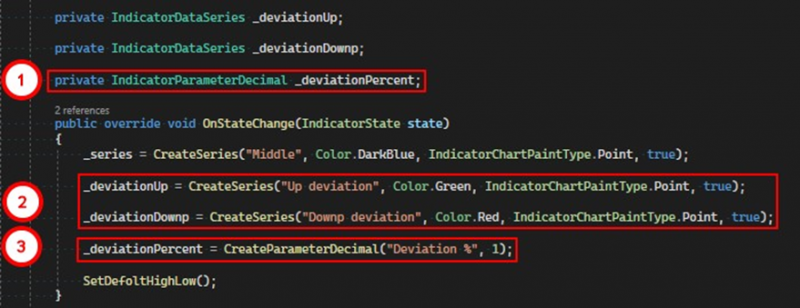
1. Create a private field of type IndicatorParameterDecimal.
2. Create additional data series for the upper and lower deviation lines.
3. Create a parameter using the method CreateParameterDecimal. The first argument to the method is the desired name for the parameter. The second argument sets the target value of the parameter.
Create a method that will calculate the size of the deviation, using the value of the previous day's middle and the _deviationPercent parameter:

To obtain the target value of the parameter of this type, refer to the property ValueDecimal. And now, using the CalcDeviation method, calculate the values for the deviation lines:
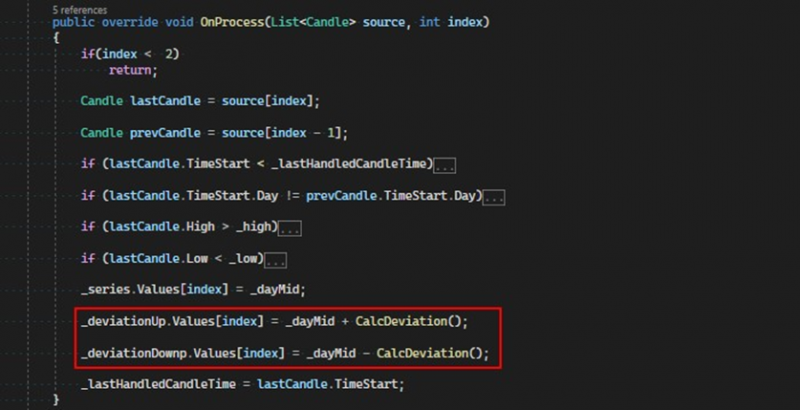
As a result, the indicator will look like this:
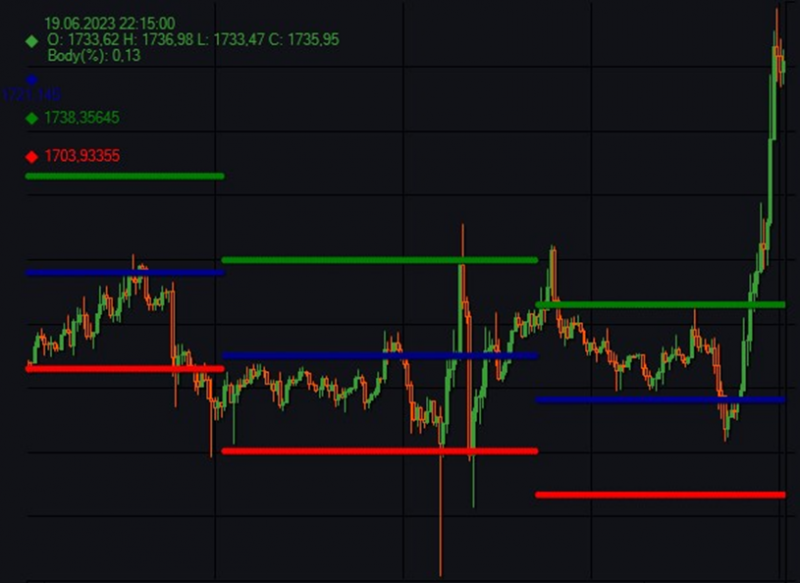
Fig. 2. Display of indicator data series on the chart.
IndicatorParameterString.
The IndicatorParameterString class allows for the passing of any string values as parameters to indicators. To add parameters of this type to an indicator, Aindicator provides two methods, and the selected method determines how this parameter is used in the graphical interface.

If the parameter is created using the method CreateParameterString, it will be displayed in the indicator settings window as a field for entering any characters:
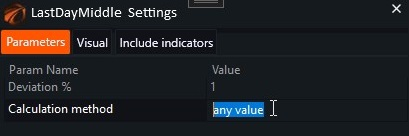
Fig. 3. Visual representation of the IndicatorParameterString parameter.

However, if you resort to using the method CreateParameterStringCollection, the parameter will be displayed as a dropdown list:
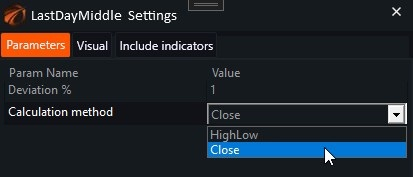
Fig. 4. Another way of displaying the IndicatorParameterString parameter.
Essentially, this is an analogy to enumeration. We limit the list of values available for the user to choose from.
Let's continue modifying our indicator and add the ability to choose the method of calculating the maximum and minimum. We'll implement two methods:
1. HighLow – use the High and Low values of the candle.
2. Close – use only the closing price of the candle.
First, we'll change the class's constructor:
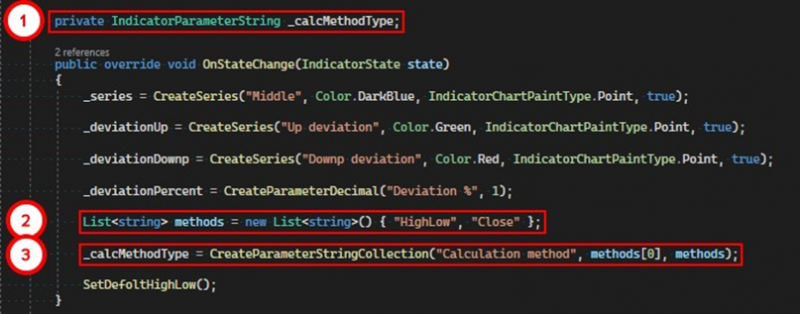
1. Create a private field of type IndicatorParameterString.
2. Create a list of values available for the parameter.
3. Use the method CreateParameterStringCollection to create the parameter itself, passing the desired name, default value, and list of available values.
Next, the logic for calculating the maximum and minimum will be taken out into a separate method:
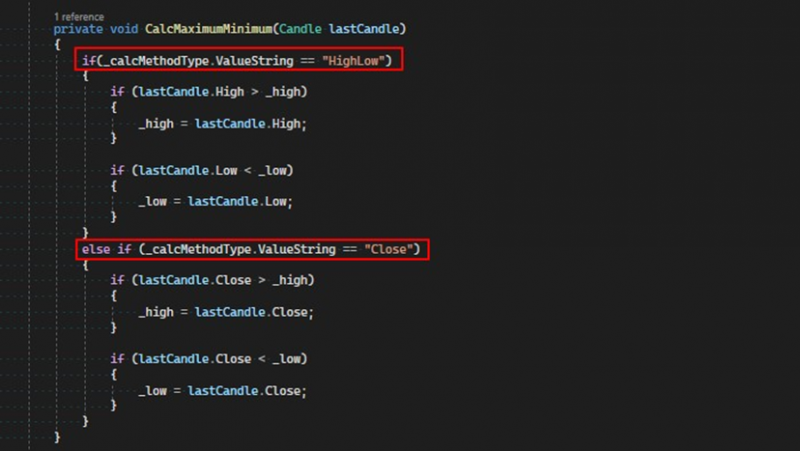
To get the value of the parameter, you need to call the ValuesString property. This way, we determine the method of calculating the maximum and minimum.
Choosing the method of calculation by closings allows the exclusion of wicks from calculations:
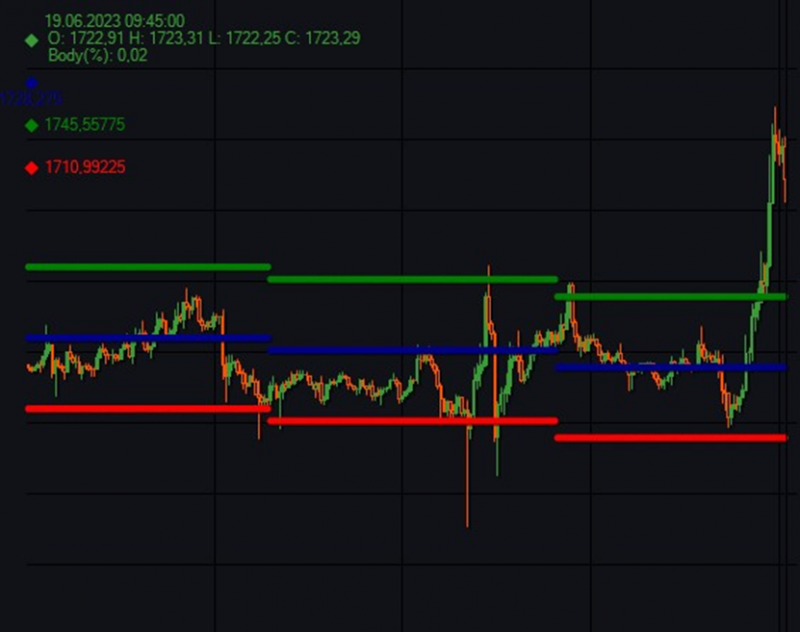
Fig. 5. Visual representation of the indicator on the chart.
IndicatorParameterBool.
The IndicatorParameterBool class allows for the use of Boolean values as parameters of an indicator. To create parameters of this type, the method CreateParameterBool is used, which takes the display name and the default value. Like all parameters, this one has a special property, ValueBool, in which it stores its value.
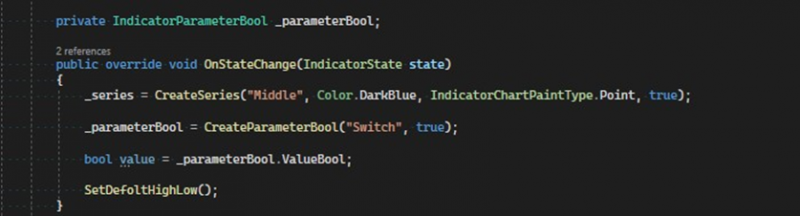
The code for the modified indicator can be downloaded at the link.
If you have any difficulties or questions, please write to the support chat. Link