Exchange Instrument, Examples of Using the Security Class.

public Security SecuritiThe property provides access to the tab's trading instrument. The instrument holds a vast array of useful information. Below, we will explore a few scenarios for using this data.
Using the price step for setting slippage.
On some trading venues, there are sections that do not support market orders. We can independently simulate such an order using a limit order. For example, to buy, one would use a price above the best offer price in the order book. This margin can be referred to as the maximum permissible slippage. But there's a problem. Many instruments have different price steps and in a crude version, it would be necessary to tailor the robot to each instrument. To make it universal for all securities, we use the PriceStep property.
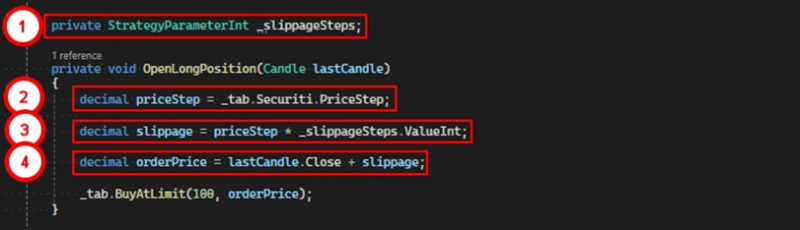
1. A parameter for storing the number of price steps.
2. Obtain the size of the price step for the current instrument on the tab.
3. Calculate the slippage size in the instrument's price measurement units.
4. Calculate the order price, taking into account the slippage.
Checking the instrument's maximum and minimum price.
Some instruments have an upper and lower price boundary, beyond which it is forbidden to place orders. To avoid receiving an error when placing an order, these very boundaries must be checked. The Security class has two fields – PriceLimitHigh and PriceLimitLow – representing the upper and lower price boundaries, respectively. Use them in the trading logic.
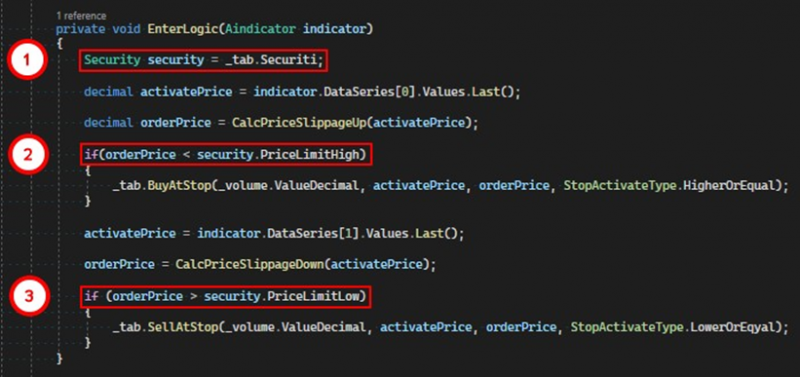
1. Get a reference to the instrument on the tab.
2. Check if the order price is less than the value of PriceLimitHigh, meaning a conditional buy order can be placed.
3. Similarly, with shorting, if the potential order price is above the PriceLimitLow price, a conditional sell order can be placed.
Stopping trading before expiration.
When trading futures contracts, the Expiration field value, which contains the contract's expiration date, will be helpful. To ensure that the robot does not remain in a position at the time of expiration and is not caught in "delivery", the following logic will be implemented: a day before expiration, the robot closes all positions, halts trading, and sends out an informational message.
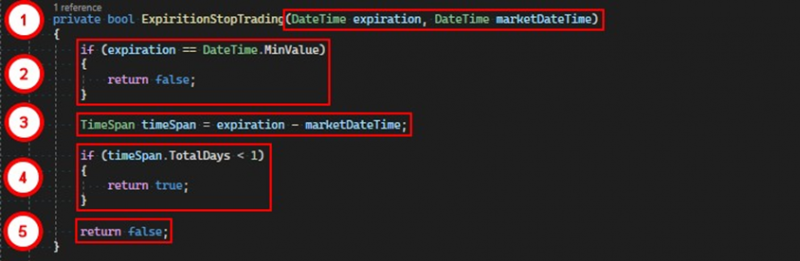
The method checks if it's time to stop trading due to the approaching expiration.
1. It accepts 2 parameters – the expiration date and the current exchange time.
2. If the expiration parameter has the default value, it means the instrument is traded indefinitely, and we return false.
3. We calculate the time interval remaining until expiration.
4. If the total number of days in this interval is less than one, we inform the robot that it's time to stop trading.
5. Otherwise, there is no prohibition on trading.
And then we use this method as a filter:
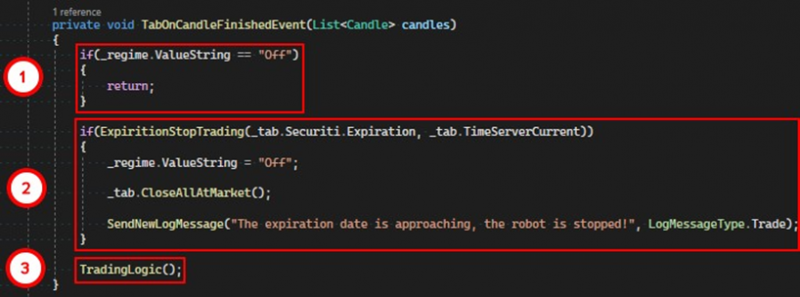
1. If the robot is already turned off, exit the method.
2. Use the filter created above, passing it the expiration date of the instrument and the exchange time. If it returns true, we stop the robot, close all positions, and send the information to the log.
3. Otherwise, we continue to execute the trading logic.
Converting cryptocurrency into volume.
A common case in crypto robots is to convert coins into trading volume. For example, you don't want to set the volume manually for each security, but want each bot to trade with 100 USDT. To do this, we need to convert the coins into volume.
Let's consider the ETH/USDT pair. ETH is the quoted currency, USDT is the base currency. To buy the quoted currency, we need to give the base currency. That means if the instrument price is 1872, to buy one ether, we need to spend 1872 USDT. But we want the bot to buy for 100 USDT.
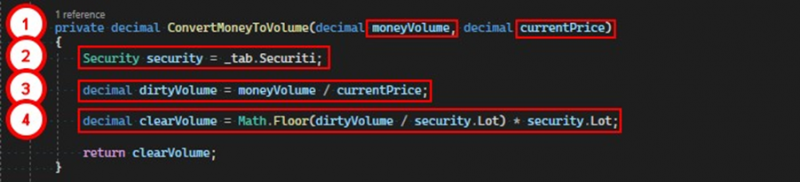
1. The ConvertMoneyToVolume method first takes the volume of the base currency as a parameter, the second – the price of the order.
2. Get a reference to the instrument on the tab.
3. We calculate the gross volume by dividing the volume of the base currency by the price.
4. We calculate the net volume so that it meets the exchange's requirements, otherwise an order with an inaccurate volume will be rejected.
To specify the volume, we use such an instrument parameter as Lot – volume precision. Imagine that Lot for the ETH/USDT pair is 0.01, and calculate the volume we need.
dirtyVolume = 100 / 1872 = 0,0534188034188034But the exchange will not accept such a value because the precision in our case is no more than two decimal places. To discard the extra digits, we divide this value by Lot. Take the integer part of the resulting number and multiply by Lot.
clearVolume = 0,0534188034188034 / 0,01 = 5,341880341880342 (отбрасываем дробную часть) = 5 * 0,01 = 0,05In total, we found out that to buy ETH for approximately 100 USDT, it's necessary to place an order with a volume of 0.05.
If you have any difficulties or questions, please write to the support chat. Link