Embedding an indicator into the code of another indicator. Binding parameters.

Complex indicators often use the values of other indicators in their calculations. OsEngine provides a mechanism for embedding one indicator into another. The same indicator factory is utilized for this purpose. Let's write an indicator that requires a moving average to operate, and based on it, a channel will be constructed with a margin set to a certain percentage. Let's call it "SmaChannel." The process of embedding an internal indicator will look like this:
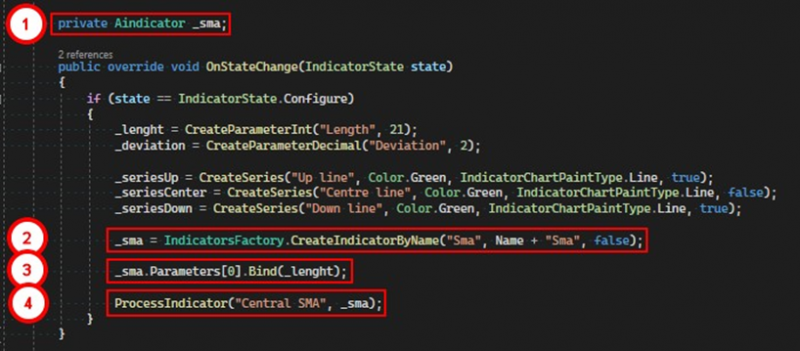
1. First, you need to create a variable of the type Aindicator, which will store a reference to the internal indicator.
2. Using the factory, we create an indicator, in our case, it's a simple moving average.
3. We bind our _length parameter to the moving average's length parameter.
4. We call the ProcessIndicator method of the base class, passing the name for the internal indicator and the indicator itself.
Each parameter has a Bind method, which takes another parameter and links both in such a way that if the value of one changes, the value of the other automatically changes as well. Thus, by binding once, there's no need to monitor the parameters of embedded indicators. Moreover, if you change the value of a parameter in the embedded indicator, it will also change in the parent indicator.
All embedded indicators are displayed in the last tab of the settings window:
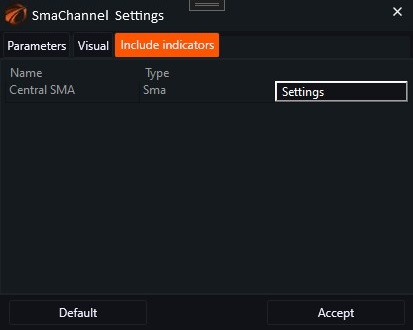
Fig. 1. Tab with settings for embedded indicators.
Before calling the OnProcess method of this indicator, the program will first process all internal indicators, so when accessing the moving average, we will obtain its current values:
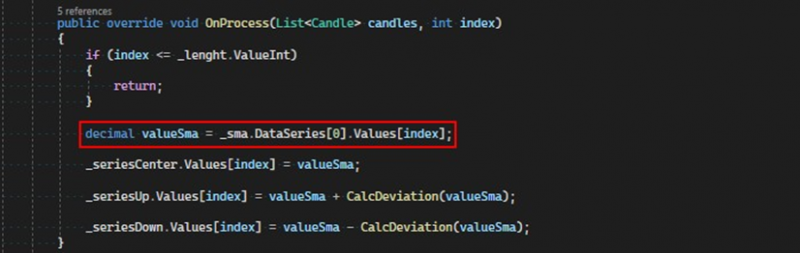
All data series in the indicator are created using the CreateSeries method, which places them in the DataSeries list located in the parent class. Therefore, to access the required data series, one needs to refer to this list by index. In other words, to use the indicator, it is desirable to know the order in which the data series are added.
In our case, we know that the moving average has only one data series, which means it will be located at the zero index. In turn, the data series stores its values in the Values list.
The source code file for the SmaChannel indicator can be found at the link.
If you have any difficulties or questions, please write to the support chat. Link