Creating a Composite Indicator from Scratch to Completion. An Example with a Description.

To consolidate the material covered, let's examine the code of the composite Alligator indicator, which is located in the scripts folder. The Alligator is a combination of three different-length smooth moving averages with different forward shifts. Accordingly, there is one SSMA (Smoothed Simple Moving Average) indicator for each, with two parameters and one data series. Let's first look at the fields of the class:
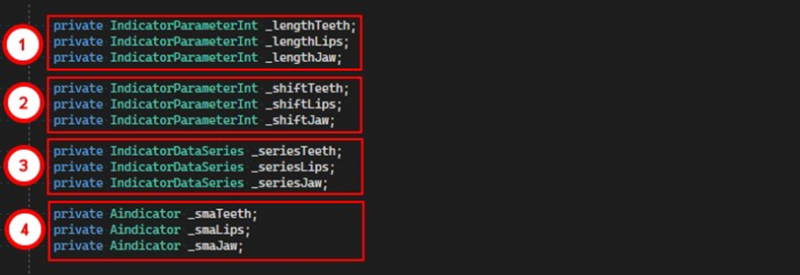
1. In the first part, parameters intended for determining the lengths of the internal moving averages are grouped.
2. In the second block are the shift parameters for the Alligator data series.
3. In the third are the data series of the indicator itself.
4. In the last block, all three internal indicators are grouped.
Next, let's look at the indicator configuration process in the OnStateChange method:
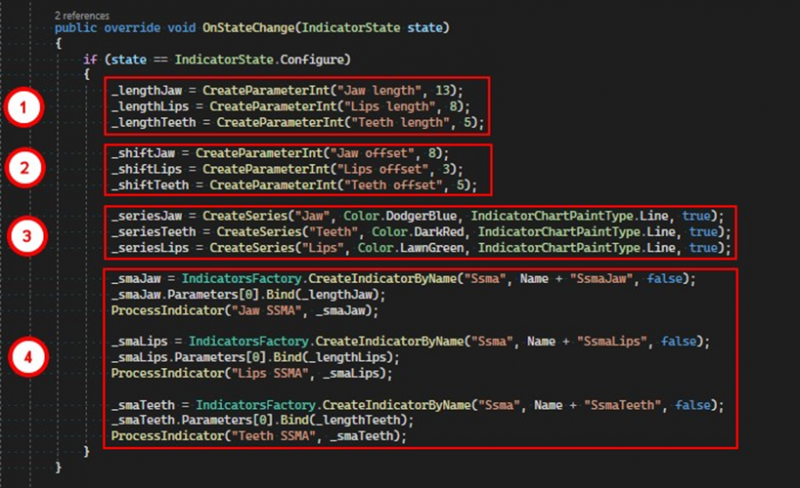
1. Parameters that will set the settings of the internal indicators are created.
2. Parameters for shifting the Alligator series are created.
3. The data series of the indicator, the so-called jaw, teeth, and lips, are created.
4. The process of creating internal indicators.
Each internal indicator is created according to the following principle:

1. An SSMA indicator object with the necessary parameters is created using a factory.
2. The first parameter of the created indicator is bound to the corresponding parameter of the parent indicator.
3. The created indicator is set as internal using the ProcessIndicator method.
Next, in the OnProcess method, all three data series are populated.
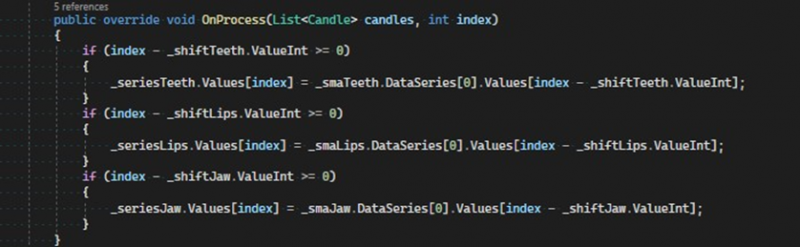
Let's take a closer look at the calculation logic with the example of one data series _seriesTeeth.
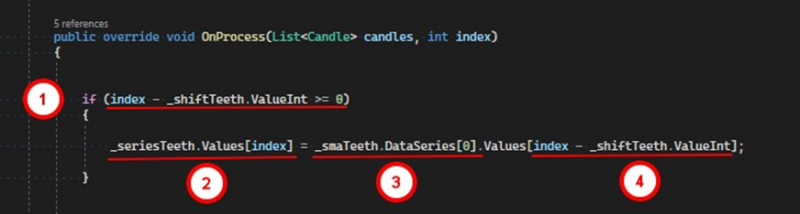
1. It is checked whether the indicator has a sufficient amount of data taking into account the shift.
2. If there is enough data, we set the last value of the series.
3. For this, we refer to the corresponding internal indicator.
4. We do not take the last value but one that accounts for the shift parameter.
Note the following fact. All objects created in the indicator are placed in the corresponding lists in the same order as they are created. All parameters are stored in the property:
public List<IndicatorParameter> ParametersNumerical parameters, namely, objects of classes IndicatorParameterInt and IndicatorParameterDecimal are converted to ParameterDigit objects and placed in the list:
public List<ParameterDigit> ParametersDigitAll data series are placed in the list:
public List<IndicatorDataSeries> DataSeriesAll embedded indicators are placed in the list:
public List<Aindicator> IncludeIndicatorsThe ProcessIndicator method, in addition to the indicator, takes an arbitrary name. These names are placed in the list
public List<string> IncludeIndicatorsNameand are stored there parallel to the indicators, meaning if an indicator is added to its list at index 0, then the name will be stored in the corresponding list at index 0.
If you have any difficulties or questions, please write to the support chat. Link