CloseAtStop

The CloseAtStop method sets a stop-loss for a position. The logic for checking stop activation is handled in the terminal. One could say it's a conditional order that only becomes a real order when certain conditions are met.
public void CloseAtStop(Position position, decimal priceActivation, decimal priceOrder, string signalType)1. position – the position for which a stop-loss needs to be set;
2. priceActivation – the price upon reaching which a real order will be sent to the exchange;
3. priceOrder – the price for the executing order;
4. signalType – the type of signal for closing a position;
Let's assume we need such exit logic: after opening a position, it will be closed either by a stop-loss or based on time.
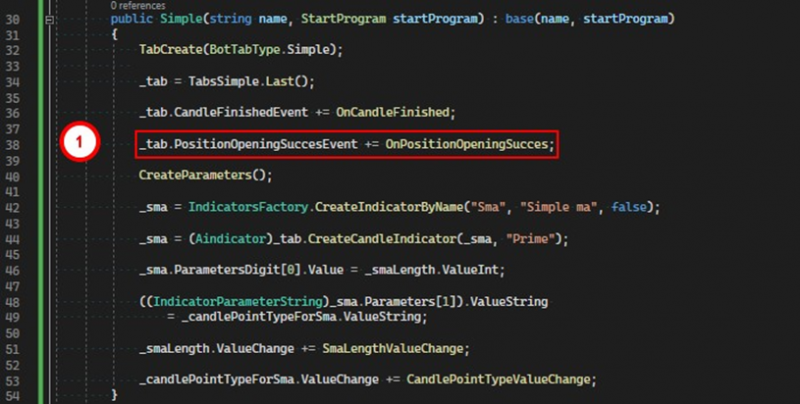
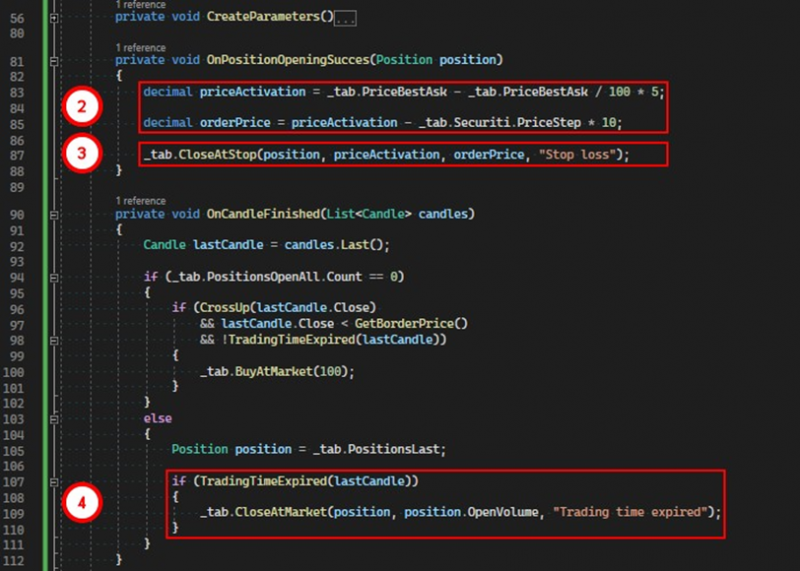
1. Subscribe to the event of successful position opening.
2. In the handler for this event, calculate the order activation price and the price for the order itself.
3. Set the stop-loss for the position by calling the CloseAtStop method.
4. After the set time expires, close the position at the market.
Important note 1:
The stop-loss can only be set after the position has been opened, that is, when its open volume is greater than zero. For this purpose, the PositionOpeningSuccesEvent is perfectly suitable. It signals to the robot that at least one trade has been executed for the opening order. We will set the stop-loss in the handler for this event.
public void CloseAtStop(Position position, decimal priceActivation, decimal priceOrder)A method overload in which the signalType parameter is not used.
Important note 2:
Upon the execution of this type of order, any CloseAtProfit order will be canceled if one had been set for the position.
If you have any difficulties or questions, please write to the support chat. Link