Accessing Indicator Data and Setting Parameters from the Robot Code.

Using the Alligator indicator as an example, let's examine the order in which data is arranged in the indicator and how it can be accessed from a robot.
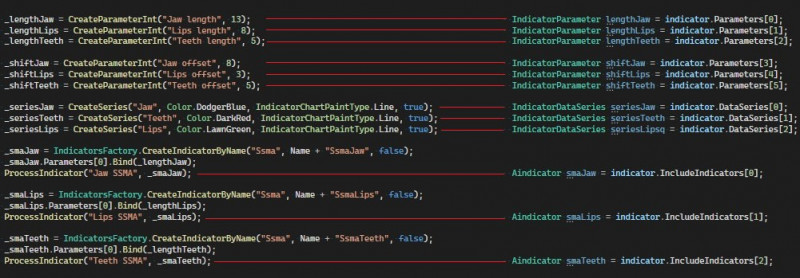
On the screenshot on the left is the order of object creation in the indicator, on the right is how to access the same object from the robot:
Let's examine the mechanism for setting indicator parameters using strategy parameters. Numerical parameters can be set in two ways. The first method involves getting the indicator parameter through the ParametersDigit list:
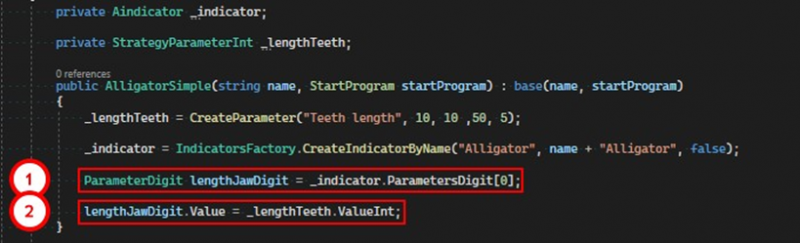
1. Obtain a reference to the required digital parameter.
2. Assign the value of the strategy parameter to the value of the digital parameter from the indicator.
The second method involves getting the required parameter from the Parameters list:
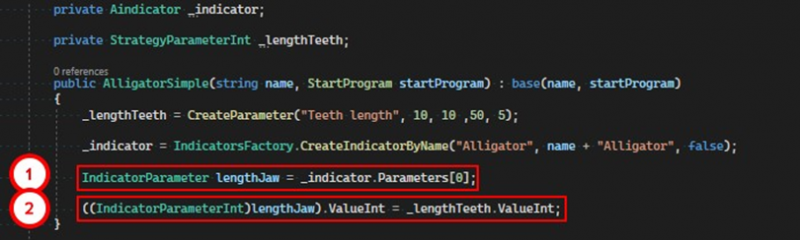
1. Obtain a reference to the required parameter.
2. Cast it to the derived type and set the value.
If you have any difficulties or questions, please write to the support chat. Link